For the Steam building game
How They Built
the Pyramids Wiki & Guide
From Nile clay to the next layer.
Find the step that keeps your build moving.
Updated 2026-11-16 · Mixed versions
What are you working on?
Search guides, machines and building tasks.
GuideBrick AutomationFeed molds with a Clay Hopper, connect the power network, then collect bricks with adjacent belts or a Gather Work Post.GuideShabtiInspect Shabti with F at the market, buy at the listed quote, and use Gather plus ongoing wallet rations to keep hauling on the intended route.GuidePowerCompare connected stress demand with capacity. Then trace each machine’s power port, shafts and gearbox branches before adding more wheels.GuideSorterLook at a Sorter and press F in #0.42 to open its settings. Check the independent rule attached to each of the three exits.GuideGrand PyramidFinish a pyramid, then select GRAND PYRAMID on the new pyramid card for 105,995 bricks and crews of up to 16.GuideDemolitionHold Q with the hammer to demolish a monument in #0.42; no resources come back. Starter molds, crates and gym gear unlock removal at 1,000 bricks.GuideFirst BrickUse the Clay Bowl, fill a 600 g starter mold, dry the brick, collect it with LMB and place it on the pyramid’s current layer.GuideCo-op SaveJoining a saved co-op world with an empty map and no player? Install the update containing #0.42’s fix, then retry the original world.GuideGold ChipsFind the small gold-chip bowl under an existing Gold-tab panning tray, use LMB to take its chips, and learn what the Goldsmith’s Crucible uses them for.GuideTemple of PtahOnce the Temple of Ptah card is buildable, place its blueprint and fill it with 407 ordinary bricks for a permanent team Refining +25% blessing.GuideMachine UpgradesAim at a Polishing Wheel and press F. Buy Polish time, Bins or Crew separately with team coins; check the new value and free seats.GuideSpeed GearsPlace Speed Gears on a shaft, then press F on the placed gears to adjust the ratio. Faster machines also put more stress on the power network.GuideControlsPress 1 for hands, 2 for the clay bowl, or 3 for the hammer. Open Plans with RMB; use F to search. #0.42 adds controller window controls.GuidePolished BricksFeed ordinary mud bricks to a Polishing Wheel, add Shabti or shaft power, then take the polished output. Use a Polishing Stone for manual work.GuideBelt JunctionsUse a Splitter for one input and up to three exits; use a Merger for up to three inputs and one exit. Follow the arrows and clear blocked routes.GuideDryingBlow with RMB for a quick fix. Aim a Stand Fan at wet molds, or place a Clay & Molds Kiln where its live coverage reaches them; collect at Ready.GuideShabti BuildersPut a Shabti onto a Work Post with LMB, choose Build, and keep the post near the pyramid with bricks in its range. Check assignment before restarting.WikiClay HopperStores clay and supplies molds within reach. In the shown layout, its tooltip reports 40 kg capacity and 3.5 m reach.WikiClay MoldThe starter mold needs 600 g of clay. Dry it to Ready, then use hands and LMB Collect brick; E HOLD picks up the mold.WikiConveyor BeltPlace next to machines for automatic import/export. A Gather Work Post can send items to the closest belt or crate.WikiWork PostAssign Shabti with LMB. Use Build near the pyramid with bricks in range; use Gather to haul items to the closest conveyor belt or crate.WikiShabtiWorkers need ongoing coin payments from your wallet every minute; an empty wallet causes a strike.WikiLunch HearthBrew drinks, pick up the tray and feed Shabti for temporary boosts. It has no passive aura.WikiNile Water WheelSupplies mechanical power. The shown network lists 256 capacity from each connected wheel.WikiGearboxTurns or branches shaft lines. Corners place one automatically; place one on a shaft to create a branch.WikiSorterIn #0.42, look at it and press F to open the settings; check the rule for each of its three exits separately.WikiGrand PyramidAfter a pyramid finish, choose it on the new pyramid card for 105,995 bricks and up to 16 players.WikiClay BowlPress 2, scoop clay from a riverbank clay pile with LMB, then pour it into a starter mold.WikiGold Panning TrayThe Gold-tab tray washes clay into gold chips. Collect the chips from the separate bowl beneath it.WikiGold ChipsUse hands and LMB Take at the tray’s bowl. The Goldsmith’s Crucible uses chips to coat bricks.WikiGoldsmith’s CrucibleMelts chips for gold-coated bricks. It requires heat as well as chips; white-hot pouring uses 25% less gold.WikiTemple of PtahComplete its 407-brick construction with ordinary bricks for a permanent team Refining +25% blessing.WikiStarter EquipmentStarter molds, crates and gym gear can be removed after the team has placed 1,000 bricks in #0.42.WikiSaved Co-op WorldIf joining loads an empty map with no player, install the #0.42 fix and retry the existing save.WikiPolishing WheelAim at the placed wheel and press F to upgrade Polish time, Bins or Crew separately from the team wallet.WikiSpeed GearsChange the other side’s shaft speed. Press F on the placed gears to adjust; ×2 also doubles each affected machine’s stress.WikiBuilder’s HammerPress 3, then RMB for Plans. Use F to search, Q/E or arrows for tabs, and LMB to place a valid preview.WikiPolished BrickPolish ordinary mud bricks at a Stone or Wheel. The Refining cards give polished quality ×2 value; actual layer payout still varies.WikiPolishing StoneA manual mud-brick polishing station. Its Refining card says tap E, then scrub with the mouse; use the Wheel for worker or shaft operation.WikiSplitterSplits a rear belt input toward front/left/right in turn, skipping full, blocked or missing exits.WikiMergerCombines up to three incoming belts into one output, with inputs taking turns.WikiStand FanSpeeds drying for molds in front. Face it toward the wet molds rather than away from them.WikiKilnThe Clay & Molds Kiln speeds nearby mold drying. Use its live coverage preview; this is not the Glaze Kiln.
No match yet. Try a machine name, or browse the wiki.
Production, step by step
Get the brick line moving.
Empty molds, a stopped shaft or bricks going to the wrong place? Trace clay, power and collection as separate jobs.
Build & troubleshoot the line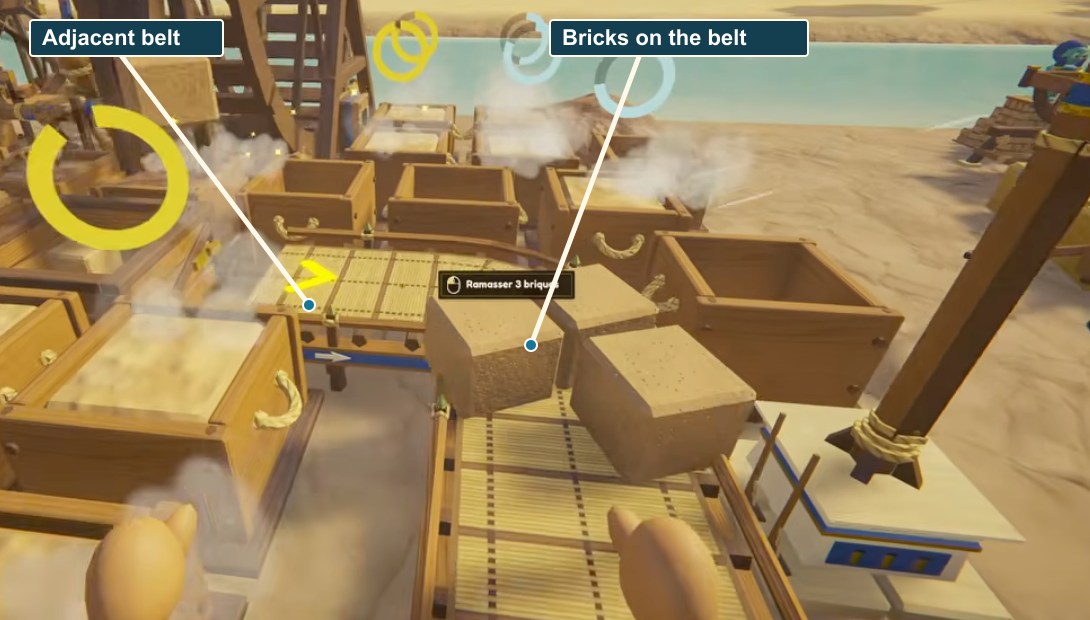
Task guides
17 available01Brick AutomationFeed molds with a Clay Hopper, connect the power network, then collect bricks with adjacent belts or a Gather Work Post.02ShabtiInspect Shabti with F at the market, buy at the listed quote, and use Gather plus ongoing wallet rations to keep hauling on the intended route.03PowerCompare connected stress demand with capacity. Then trace each machine’s power port, shafts and gearbox branches before adding more wheels.04SorterLook at a Sorter and press F in #0.42 to open its settings. Check the independent rule attached to each of the three exits.05Grand PyramidFinish a pyramid, then select GRAND PYRAMID on the new pyramid card for 105,995 bricks and crews of up to 16.06DemolitionHold Q with the hammer to demolish a monument in #0.42; no resources come back. Starter molds, crates and gym gear unlock removal at 1,000 bricks.07First BrickUse the Clay Bowl, fill a 600 g starter mold, dry the brick, collect it with LMB and place it on the pyramid’s current layer.08Co-op SaveJoining a saved co-op world with an empty map and no player? Install the update containing #0.42’s fix, then retry the original world.09Gold ChipsFind the small gold-chip bowl under an existing Gold-tab panning tray, use LMB to take its chips, and learn what the Goldsmith’s Crucible uses them for.10Temple of PtahOnce the Temple of Ptah card is buildable, place its blueprint and fill it with 407 ordinary bricks for a permanent team Refining +25% blessing.11Machine UpgradesAim at a Polishing Wheel and press F. Buy Polish time, Bins or Crew separately with team coins; check the new value and free seats.12Speed GearsPlace Speed Gears on a shaft, then press F on the placed gears to adjust the ratio. Faster machines also put more stress on the power network.13ControlsPress 1 for hands, 2 for the clay bowl, or 3 for the hammer. Open Plans with RMB; use F to search. #0.42 adds controller window controls.14Polished BricksFeed ordinary mud bricks to a Polishing Wheel, add Shabti or shaft power, then take the polished output. Use a Polishing Stone for manual work.15Belt JunctionsUse a Splitter for one input and up to three exits; use a Merger for up to three inputs and one exit. Follow the arrows and clear blocked routes.16DryingBlow with RMB for a quick fix. Aim a Stand Fan at wet molds, or place a Clay & Molds Kiln where its live coverage reaches them; collect at Ready.17Shabti BuildersPut a Shabti onto a Work Post with LMB, choose Build, and keep the post near the pyramid with bricks in its range. Check assignment before restarting.
A quick answer for each part
The workshop wiki.
Look up a machine or worker job before changing your layout. 26 entries recorded; not an exhaustive item list.
Search the wiki- Production
- Clay Hopper · Clay Mold · Conveyor Belt · Sorter · Clay Bowl · Gold Panning Tray · Gold Chips · Goldsmith’s Crucible · Polishing Wheel · Polished Brick · Polishing Stone · Splitter · Merger · Stand Fan · Kiln
- Power
- Nile Water Wheel · Gearbox · Speed Gears
- Workers
- Work Post · Shabti · Lunch Hearth
- Building
- Grand Pyramid · Temple of Ptah · Starter Equipment · Builder’s Hammer
- Co-op
- Saved Co-op World