Machine Upgrades / PC full game
Upgrade a Polishing Wheel’s speed, bins and Crew
Use your hands, aim at an existing Polishing Wheel and press F for Upgrades. Each stat has its own Buy button and price, paid from the team wallet: Polish time reduces seconds per brick, Bins increases input/output capacity, and Crew adds Shabti seats. Buy the stat that fixes your current bottleneck, then check its level and new value.
Updated 2026-11-16 · PC full game
Choose and check one upgrade
Open the existing wheel’s Upgrades window
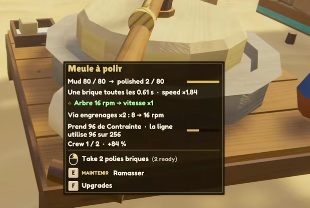
Press 1 for hands and aim at the Polishing Wheel until its tooltip shows F Upgrades. Press F. You are upgrading that placed machine; opening Plans selects a new building instead.
 Open full-size image ↗
F Upgrades opens this placed wheel’s stat window. LMB takes its finished bricks; E HOLD lifts the machine. Match the stat to the problem
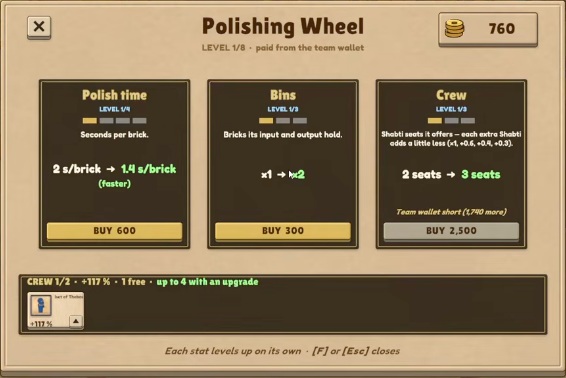
Each stat levels up on its own. Read the current value, green next value and price on the same card before buying. A capacity upgrade does not also purchase a faster polish time or another seat.
 Open full-size image ↗
Three separate purchases. This sample has 760 team coins: Polish time and Bins are affordable, but the 2,500-coin Crew upgrade is not. What the three wheel upgrades change Stat Choose it when What to check Polish time The wheel’s processing time is the bottleneck. Seconds per brick decreases. Bins You need more room in the input/output holds. The capacity multiplier increases. Crew You need another Shabti seat on this wheel. The number of available seats increases. Check team coins, then buy the selected stat
Use the displayed team wallet, not a price from another player’s machine. Click the chosen Buy button only when it is available. The menu states the missing amount when the wallet is short. Reopen or reread the card after purchase: its level/current value should advance and the next upgrade preview should change.
Open full-size image ↗A close view of the unaffordable Crew purchase: the window tells you how many more team coins are needed. Check Crew occupancy after adding a seat
Read the Crew row at the bottom: occupied seats and free seats tell you whether there is room. The shown menu has Crew 1/2 and 1 free; its current two-seat capacity is not the final limit, because it explicitly says up to 4 with an upgrade. Buying capacity does not itself place a Shabti into the new seat. Follow the worker guide for hiring and worker upkeep.
Success signal
The purchased stat’s current level/value has advanced. For Crew, the wheel has more seats and the Crew row shows whether those seats are occupied or free.
Troubleshooting
If Buy is unavailable, read the team-wallet shortfall on that card. If nothing changed in another stat, that is expected: stats are bought separately. If the machine has a free seat but no extra worker, a Crew upgrade has created room rather than hired or assigned a Shabti. If the powered wheel is stopped, check its power network before buying processing speed.
Sources
The English window shows independent Polish time, Bins and Crew purchases paid from the team wallet, with current/next values and an insufficient-coins message. MacicTV’s separate save shows later stat levels. These are two authors’ samples, not one before-and-after purchase sequence. Both exact recording builds are unshown; shown prices and levels are not universal costs for every machine. This page covers the Polishing Wheel window, not a complete worker-assignment walkthrough.