Power / PC full game
Fix a stopped or overloaded power network
Inspect a shaft or Nile Water Wheel and compare the connected load with the network’s capacity. Demand above capacity stops the line. Add supply to that same network or reduce its load; if a machine is still disconnected, fix the shaft path to its power port first. A nearby wheel that is not connected cannot solve that network’s deficit.
Updated 2026-11-16 · PC full game
Diagnose capacity and continuity
Start with the network tooltip
Read load and capacity before changing the build. In the shown stopped state, the line needs 560 but produces 512: a deficit of 48. The wheel itself lists +256 capacity. These are this connected layout’s values, not the needs of every production line.
Read the overloaded state Readout Shown value Meaning Connected demand 560 The machines on this line need this much. Connected supply 512 Current capacity cannot meet the load. Deficit 48 560 − 512; the network is overloaded. Trace the actual connection
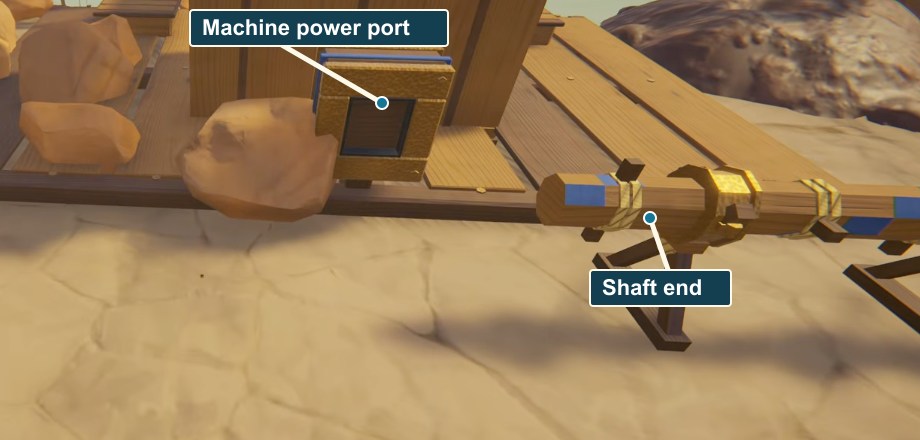
Follow the shafts to the machine’s visible blue power connector. At turns or branches, inspect the Gearbox path. The Energy menu explains that shaft corners place Gearboxes automatically, and placing a Gearbox on a shaft creates a branch.
 Open full-size image ↗
The blue machine power port and the separate shaft end are marked. Connect the shaft line to the port. Increase connected supply or reduce demand
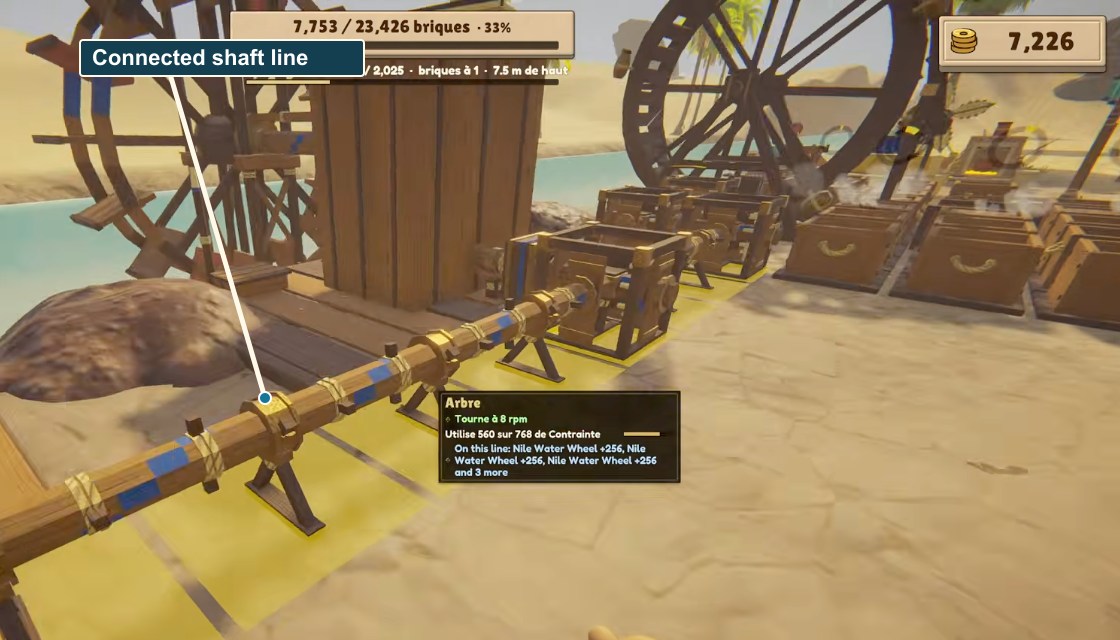
Bring another power source onto the same shaft network, or remove enough machine load for capacity to meet demand. In the example, joining the third +256 wheel brings supply to 768 while demand remains 560. Read the tooltip again after the connection.
 Open full-size image ↗
The connected shaft runs at 8 rpm. Its tooltip lists three water wheels and shows 560 load / 768 capacity. The restored readout Load Capacity Motion 560 768 8 rpm; running. Check the powered machine’s own result
A turning network establishes power. If the machine is powered but produces nothing, inspect its material input and output next. Empty molds or a stranded brick need a material-route check, not automatically another water wheel.
Success signal
The tooltip no longer reports an overload, capacity meets the connected demand, and the expected powered parts turn.
Troubleshooting
If only one machine stays still, trace its port and branch. If the network stops again when you add a machine, compare the new demand against capacity.
Sources
Network values come from MacicTV: 62:27 shows demand 560 / supply 512 stopped; 62:51 shows the connected shaft running at 8 rpm with 560 / 768 and three +256 water wheels. The recording build is unshown. This is not a universal machine ratio or a rotation-direction rule.