Speed Gears / PC full game
Use Speed Gears to change a shaft line’s RPM
Open the hammer’s Plans menu and choose Speed Gears under Energy. Place them on a shaft, or next to a Gearbox or machine input box. Either end can receive power; the other side gets the speed ratio. Aim at the placed gears and press F to adjust it. In the ×2 example, machines on the other side run twice as fast and each uses twice the stress.
Updated 2026-11-16 · PC full game
Change speed without losing the power margin
Choose Speed Gears in Energy
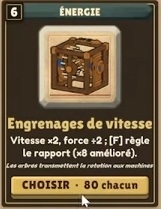
Press 3 for the hammer, then RMB for Plans. Open Energy and select Speed Gears (Engrenages de vitesse in the French footage). These are the large-and-small gears on one axle. A regular Gearbox turns or branches a shaft; use Speed Gears when you want a speed change.
 Open full-size image ↗
Engrenages de vitesse is the Speed Gears card. Its description gives ×2 speed and F to adjust the ratio. Place the gears on the powered route
Place them on a shaft, or beside a Gearbox or the machine’s input box. The tooltip allows power to enter either end, with the ratio applied to the other side. Trace which machines are on that other side before choosing a higher speed.
Use F to choose the ratio
Aim at the built gears and press F to adjust the ratio. The shown tooltip describes a basic range from ÷2 to ×3, with upgrades reaching ×5 and ×8. Use ÷2 when you want a slower downstream line; use a higher setting only after checking that line’s power demand and materials.
Read the ratio’s job Setting Effect to expect Check next ÷2 Slows the other side. Its shaft RPM and the connected machine’s own status. ×2 Twice the speed; each machine on that side uses twice the stress. Network demand against connected capacity. ×3, upgraded ×5 / ×8 Higher available speed settings shown by the tooltip. The actual load readout before assuming the network can support it. Read RPM and network stress after the change
Inspect the shaft and connected power readout. Speed Gears change the downstream speed; they do not add a water wheel or create source capacity. If the network overloads, lower the ratio again or add capacity to that same connected network. A faster powered machine also needs enough material arriving and enough room for its output.
Success signal
The intended side of the gear pair shows the chosen shaft speed, the connected network has enough capacity, and the machine can continue its task without an overload.
Troubleshooting
If the line stops after increasing speed, lower the ratio and compare load with connected capacity. If RPM changes but production does not, check the machine’s input and output. If one machine never turns, trace the shaft/branch to its power port. Do not treat a nearby unconnected wheel as extra capacity.
Sources
The Energy tooltip supports placement, input from either end, the other-side ×2 example, F ratio adjustment, ÷2 to ×3 and upgraded ×5/×8. The ×2 example explicitly doubles each affected machine’s stress; no exact stress value is inferred for every other ratio. MacicTV uses French UI and an unshown recording build. The card is an identification image, not a measured production-throughput test.