Shabti / PC full game
Hire Shabti, set the job and keep them working
At the Shabti Market, aim at a displayed worker and press F to inspect its Profile and current price before buying. The hauling checks below assume you already have a Work Post and can select Gather: in that mode, workers carry to the closest conveyor belt or crate. Keep wallet coins for rations deducted every minute; these are separate from the purchase price, and running out causes a strike.
Updated 2026-11-16 · PC full game
Set the job, then support the worker
Inspect and buy a worker at the Shabti Market
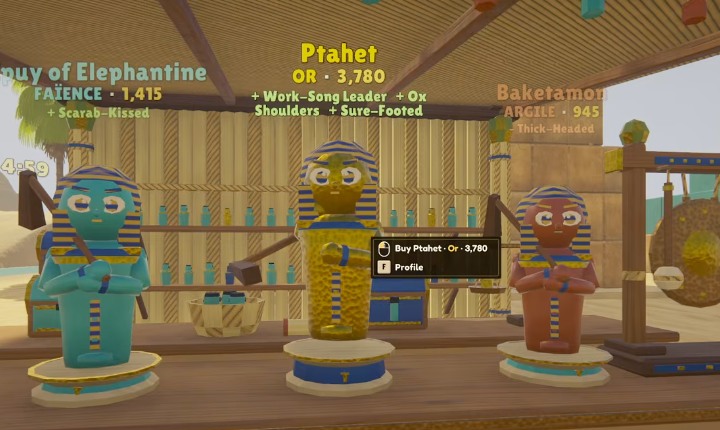
Find the covered market stall with little Shabti figures displayed on the counter. Aim at the particular worker you are considering, then press F for Profile. Compare that individual’s stats and traits and read its current quoted price. The buying prompt applies to the aimed-at worker, not an arbitrary point on the counter.
 Open full-size image ↗
Aim at a displayed candidate. The prompt offers Buy and F Profile; prices differ between the workers. Use the individual quote, then keep coins for rations
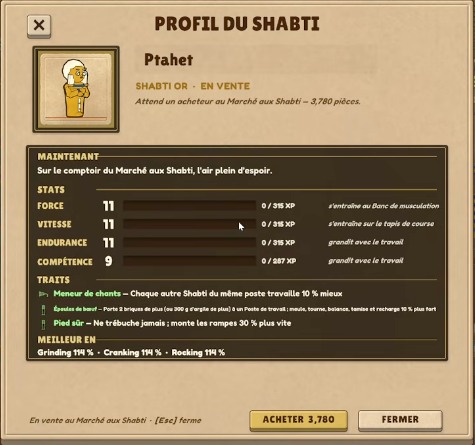
The Profile shows the named candidate, stats, traits and a purchase button with its price. Buy the chosen worker only when your wallet can cover that displayed quote. In this example, Ptahet is offered for 3,780; the neighboring candidates have different quotes. Leave coins for ongoing rations as well as the one-time purchase.
 Open full-size image ↗
One candidate’s Profile. In this French interface, ACHETER is the purchase button; 3,780 is Ptahet’s sample quote. Set the job at a Work Post
Use this route once you have Shabti and a Work Post. Set the Work Post to Gather for hauling gathered items. Building a belt alone does not tell a worker which job to perform. For pyramid construction rather than hauling, use the separate Work Post Build route linked below. Earlier English UI can label its hauling job Haul; read the current job description instead of assuming labels are identical across versions.
Inspect the closest destination
Look around the Work Post’s hauling area for both conveyor belts and crates. The developer’s rule is the closest belt or crate, so a nearer crate can explain why the intended belt stays empty. Change the local destination arrangement when you want a different receiving point.
Budget for work after hiring
The buying price and ongoing rations are different costs. Keep coins available in the wallet after hiring: rations are deducted every minute. When there are not enough coins, Shabti go on strike. Supplying drinks does not replace this payment. Lunch Hearth drinks are a separate temporary-boost mechanic: the developer says they must be fed from a tray and have no passive aura. They are not ration payments.
Success signal
The selected worker is available for assignment, Gather hauling reaches the intended nearby belt or crate, and ongoing ration payments are funded.
Troubleshooting
| Symptom | Check | Action |
|---|---|---|
| Belt stays empty | Work Post mode and the closest crate/belt | Set Gather and inspect nearer receiving points. |
| Workers go on strike | Wallet coins for ongoing rations | Restore coins; the hiring payment is separate. |
Sources
Market and Profile images show the Ptahet candidate in MacicTV at 38:00–38:15. The 3,780 price belongs to that candidate; it is not a standard hiring fee. The video uses French UI and its recording build is unshown; #0.42 did not announce a change to these entry points. Gather/destination and ration/drink rules come from the developer replies. No exact first-unlock threshold, universal wage rate or drink recipe is inferred. The Lunch Hearth note explains how boosts differ from wages; the source thread does not resolve the player’s missing feed prompt, so this page does not promise a complete feeding walkthrough.