Belt Junctions / PC full game
Split one belt into branches or merge lines
Use a Splitter to feed front, left and right exits from one belt behind it. It sends items to exits in turn, skipping exits that are full, blocked or absent. Use a Merger for the opposite job: up to three incoming belts join one output, taking turns. Lay the belts in the arrow direction and check receiving space before blaming the junction.
Updated 2026-11-16 · PC full game
Build the junction around the direction of travel
Choose the junction that matches the route
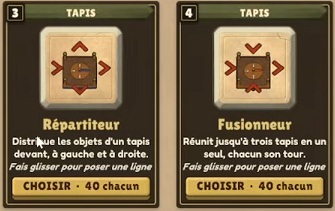
Press 3 for the hammer, RMB for Plans, then open Belts. Choose Splitter (Répartiteur) to divide a supply, or Merger (Fusionneur) to collect several lines. Their arrow icons show which sides receive and which sides send.
 Open full-size image ↗
Répartiteur = Splitter; Fusionneur = Merger. The arrows distinguish branching from combining. Choose by the material route You need Choose One incoming line to feed branches Splitter: input behind; exits in front, left and right. Several incoming lines to share one exit Merger: up to three inputs into a single output. Separate bricks by type or quality Use a Sorter and check each exit rule. Lay the input and exits in the arrow direction
For a Splitter, bring the incoming belt to its rear and run receiving belts away from its front/left/right exits as needed. The tooltip allows placing it on an existing belt to replace that segment; if a building is behind it, it can draw from that building like a belt. With the belt tool selected, drag with LMB to lay a line. Follow the preview arrows and use Ctrl to reverse travel direction before continuing.
Watch each Splitter exit instead of expecting equal piles
Feed items into the rear and observe the available exits. The Splitter serves them in turn, skipping a route that is full, blocked or missing. An idle branch can therefore be a destination problem. Clear room on that branch or fix its direction, then watch the junction again. This rule does not promise equal measured throughput or a fixed output ratio when routes are blocked.
Combine lines with a Merger
Use the Merger when up to three incoming belts should leave on one line. Orient its arrows toward that single output and keep the output route clear. Its card says the inputs take turns; it does not describe a programmable input priority. If every input backs up, inspect the shared output and receiving machine first.
Use a Sorter when the decision depends on the item
A Splitter distributes items across available exits, and a Merger combines inputs. For a type-specific route, choose the Sorter instead. On #0.42, look at that Sorter and press F; each of its three exits has a separate rule.
Success signal
Items enter from the intended side and leave along the intended receiving route. A Splitter skips unavailable exits; a Merger carries its incoming items onto the clear shared output.
Troubleshooting
For a dead branch, check belt direction, a missing exit, a full belt or a blocked receiver. For several backed-up Merger inputs, check the single output. If the task is to separate item types, use a Sorter rather than expecting the Splitter to filter.
Sources
MacicTV’s French Splitter tooltip establishes rear input, front/left/right exits, turns, skipped full/blocked/missing exits, and placement over a belt or behind a building. The Merger card establishes up to three inputs, one output and turns; no further priority, equal-throughput or filtering behavior is inferred. The video’s exact recording build is unshown. English names here translate the pictured French cards.