Drying / PC full game
Dry filled molds faster with fans or a Kiln
First check that the mold contains clay and is Drying. Hold RMB while aiming at it for manual blowing. For repeated batches, aim a Stand Fan toward the molds in front of it, or place the Kiln from Clay & Molds close enough that the game’s current coverage preview reaches them. These speed drying; collect the same finished mud brick when the mold says Ready.
Updated 2026-11-16 · PC full game
Fix the drying bottleneck
Confirm the molds are wet, not empty or already ready
Aim at a mold and read its state. An empty mold needs clay first. A Drying mold is the target for this guide. A Ready mold needs collection, so faster drying will not remove the finished brick or refill that mold for you.
Blow on one mold for an immediate result
Aim at the filled mold and hold RMB to blow, as in the first-brick route. Watch its drying progress, then switch to hands with 1 and use LMB Collect brick when Ready appears. Use this when a small number of wet molds needs attention without changing the layout.
Point a Stand Fan toward a row of molds
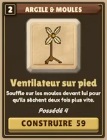
Open the hammer’s Plans menu and choose Stand Fan from Clay & Molds (Ventilateur sur pied in the French menu). Its card describes molds in front drying twice as fast. Position and face it toward the wet molds, then watch those molds’ own drying progress. A fan facing away is not serving the intended row.
 Open full-size image ↗
Ventilateur sur pied / Stand Fan affects molds in front. Point it toward the row you want to dry. Place the drying Kiln using its live coverage preview
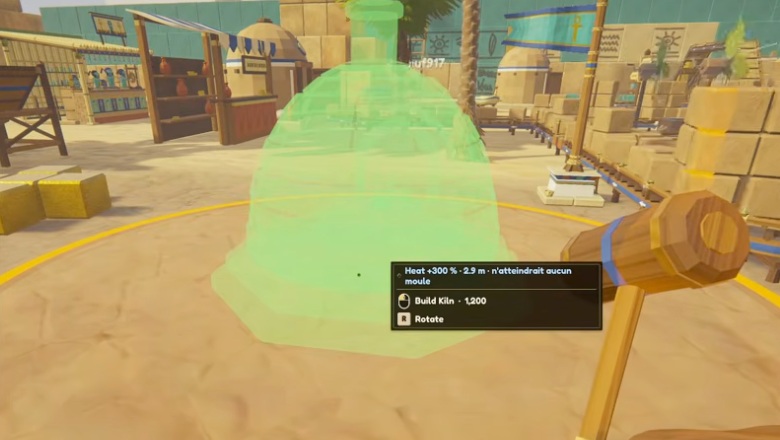
Choose Kiln from Clay & Molds, not Glaze Kiln from Refining. The Kiln’s tooltip describes nearby molds drying four times as fast and says the effect stacks with fans with diminishing additions. Move its preview until the coverage reaches the molds you actually use; a message that it would reach no molds means that position will not help. Use the current in-game circle and feedback to decide placement.
 Open full-size image ↗
This preview would not reach a mold. Reposition it around your active molds before building; its displayed reach is a sample, not a universal radius. Use the right drying aid Aid What its shown rule describes Stand Fan Molds in front dry ×2 faster. Clay & Molds Kiln Nearby molds dry ×4 faster; stacking with fans has diminishing additions. Glaze Kiln A different Refining machine; it processes polished bricks, not this mold-drying task. Check Ready and keep the rest of the line moving
After the drying aid reaches the intended molds, check their own progress to Ready. Collect the bricks by hand or through the existing collection route, and keep clay arriving for the next batch. If molds wait empty or ready bricks sit uncollected, fix that handoff before adding another drying aid.
Success signal
The intended filled molds progress to Ready, and their bricks can be collected. The aid’s facing or coverage includes those molds; empty inputs and blocked collection are handled separately.
Troubleshooting
If the mold is empty, supply clay. If it is Ready, collect the brick. For a Fan, check the forward direction. For a Kiln, use the live coverage circle and no-molds warning. Do not assume each extra fan or Kiln multiplies final production at a fixed rate.
Sources
The Fan and Kiln effects are descriptions in MacicTV’s Clay & Molds menu, not measured end-to-end throughput. The footage’s Kiln menu reach and placement-preview reach differ, so this guide gives no fixed radius and relies on current coverage feedback. Its exact recording build is unshown. This Kiln accelerates wet molds; it does not establish a separate fired-brick quality. The separate Glaze Kiln card describes polished-brick refining.